Graphing vs Scientific Calculator: Which One Do You Need for Algebra and Trig?

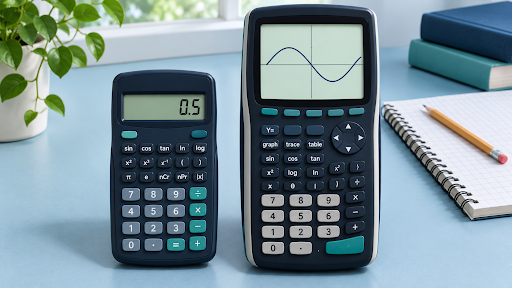
A scientific calculator is usually enough when your algebra or trigonometry problem asks for a numerical result, such as the value of a logarithm or the length of a triangle’s side. A graphing calculator is useful when you need to see how a function behaves, find where two curves intersect, or identify several solutions within an interval.
The distinction matters because the same topic can call for either tool. Finding (\sin(30^\circ)) takes a few keystrokes on a scientific calculator. Finding every angle between (0^\circ) and (360^\circ) where the sine equals (0.5) is a different task. A graph can show both solutions at once.
What Is the Difference Between a Scientific and Graphing Calculator?
A scientific calculator evaluates expressions. It handles operations beyond basic arithmetic, such as powers, square roots, logarithms, and trigonometric functions. You enter an expression and read the result. Many scientific calculators also let you choose between degrees and radians, which affects how they interpret angle inputs.
A graphing calculator adds a coordinate plane. You can plot an equation and inspect its shape, intercepts, and intersections. Some graphing tools label these points when you select the curve. That helps when you need to understand the relationship between two quantities across many input values.
| If your assignment asks you to… | Start with… |
| Evaluate a power, root, or logarithm | A scientific calculator |
| Find a side length using sine, cosine, or tangent | A scientific calculator |
| Check the arithmetic in the quadratic formula | A scientific calculator |
| Find where two functions cross | A graphing calculator |
| Compare the amplitude and period of trig functions | A graphing calculator |
| Give an exact answer and show your method | Written algebra, with a calculator to check |
When a Scientific Calculator Is Enough for Algebra
A scientific calculator is a good fit when you can write the mathematical setup yourself and primarily need help with the arithmetic. This covers tasks such as substituting values, calculating powers, or checking the square root in the quadratic formula.
Suppose a question gives you (f(x)=2x^2-3x+1) and asks for (f(-2)). Substitute the value to get (2(-2)^2-3(-2)+1). The result is (8+6+1=15). The brackets show that the square applies to the entire value (-2).
If you’re working in a browser, you can visit CalcSolver and check the available calculator options against your assignment. Try an expression with a negative number and brackets first. An interface that lets you review the full expression makes it easier to spot a missing sign or misplaced exponent.
A scientific calculator also works well for the quadratic formula. Once you have identified (a), (b), and (c), use it to evaluate (b^2-4ac) and the two branches of the formula. If the question asks for an exact radical, keep that form in your written answer and use the decimal as a check.
When Graphing Makes Algebra Easier
Graphing helps when the question is about where a function crosses an axis, how a curve changes, or where two equations have the same value. You can inspect those features without evaluating a long list of individual points.
Find the Roots of a Quadratic
Take (x^2-5x+6=0). Enter (y=x^2-5x+6) in a graphing calculator and look for the points where the parabola meets the horizontal axis. The crossings are at (x=2) and (x=3).
You can then verify both values by factoring the expression into ((x-2)(x-3)). The graph shows where the solutions are, and the factorization explains why both values make the expression equal to zero.
Compare Two Equations on the Same Axes
To solve (x^2=2x+3) visually, plot (y=x^2) and (y=2x+3). The curves meet at ((-1,1)) and ((3,9)), so the solutions are (x=-1) and (x=3).
If you can see only one crossing, check the graph window. For example, a window that starts at (x=0) will hide the intersection at (x=-1). Set the viewing range before deciding how many solutions the graph shows.
Which Calculator Is Better for Trigonometry?
For right-triangle problems, a scientific calculator usually does the job. Suppose a ramp is 10 metres long and forms a (30^\circ) angle with the ground. Its vertical rise is (10\sin(30^\circ)), which equals (5) metres. Set the calculator to degrees before entering the angle. With radian mode selected, the number 30 represents a different angle.
A graphing calculator is more useful for questions about repeating patterns. To solve (\sin(x)=0.5) between (0) and (2\pi), plot (y=\sin(x)) and (y=0.5) in radian mode. In that interval, the curves meet at (x=\pi/6) and (x=5\pi/6). An inverse sine calculation gives the principal value (\pi/6), while the graph shows the second crossing in the specified interval.
To compare how trig functions change, try plotting (y=\sin(x)) alongside (y=2\sin(x)) in the CalcSolver graphing calculator. In radians, both functions repeat every (2\pi). The second curve reaches (2) and (-2), while the first reaches (1) and (-1). Plotting the pair together shows what changes when you double the amplitude.
Which One Should You Use for Class and Exams?
Look at a few recent assignments. If most questions involve evaluating expressions, checking arithmetic, or calculating measurements from known angles, start with a scientific calculator. If your coursework regularly asks you to compare functions, estimate intersections, or interpret changes in a graph, a graphing calculator will be more useful.
For an exam, check the rules for that specific assessment before choosing a device or buying one. Ask whether the test provides a calculator, permits a handheld model, or requires written work for particular questions. Practise entering negative values, checking angle mode, and setting the graph window on the tool you’ll actually use.
Frequently Asked Questions
Is a scientific calculator enough for Algebra 2?
It can handle many numerical tasks, including powers, radicals, and logarithms. A graphing calculator is useful if your class regularly asks you to plot functions or estimate intersections.
Can a graphing calculator do scientific calculations?
Graphing calculators commonly evaluate expressions as well as plot graphs. Check the functions and input controls on the model or browser tool you plan to use.
Should I use degrees or radians for trig?
Use the unit stated in the problem. An angle marked (30^\circ) calls for degrees. An interval from (0) to (2\pi) in a standard sine problem calls for radians.
Can I use a graph to give an exact answer?
A graph helps locate a solution and check whether it makes sense. If the question requires an exact fraction, radical, or multiple of (\pi), use algebra or a known trig value to justify the exact form.