Robot Vacuum Keeps Getting Stuck on Cords? Build Better Obstacle Zones
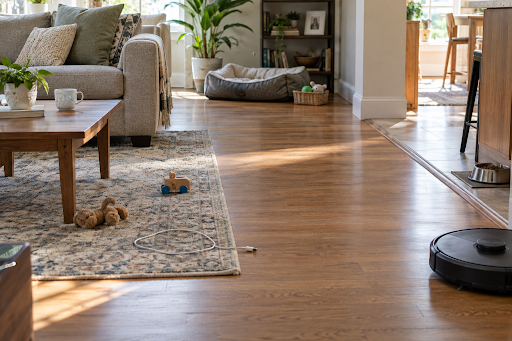
You start a cleaning run before leaving home, then get an alert: the robot has stopped with a charging cord wrapped near its brush. The toys by the couch and the pet bowl in the kitchen could interrupt the next run, too. If your robot vacuum keeps getting stuck on cords, start by sorting what must be picked up from the places that can stay off limits. The steps below cover that floor check, useful no-go zones, and a short test to see whether the route works.
Find the obstacle that is causing the stop
A charging cable can wind around a brush or wheel. A power strip adds a rigid object plus several trailing cords. Small toys move from day to day, while a pet bowl may sit in the same kitchen corner every time. Rug fringe and low furniture create different problems: one can tangle, and the other can trap a robot under an edge it nearly clears.
Make a brief note after each cleaning. Record the room, the object, and whether the obstacle normally stays in that spot. If the robot repeatedly stops in one area after loose objects are gone, inspect that location for a threshold, curled rug edge, narrow gap, or furniture base. The pattern tells you whether the answer is pickup, a route change, or a no-go zone. If the same object appears in different rooms, treat it as movable clutter rather than drawing several permanent exclusions.
Separate pickup items from zone items
A no-go zone is most useful around a stable place that the robot should skip, such as a feeding station, a play area that stays set up during cleaning, or a low-clearance furniture nook.
The table keeps the distinction practical:
| What is on the floor | Better first move |
| Loose cords, small toys, socks | Pick up before the run |
| Power strip with trailing cables | Move or secure cables, then zone the fixed corner if needed |
| Pet feeding station | Use a stable no-go zone around bowls and mat |
| Low furniture or curled rug edge | Fix the edge or block the trouble spot |
Give cords a clear route away from the floor
Follow a cord from the outlet to the device it charges. Shorten the loose span, lift the charger onto a table and place excess cable in an appropriate organizer. A power strip can often move behind furniture where its cables do not cross the cleaning path. A cord tucked under a rug can still be a problem and is harder to notice during a quick floor check.
Walk the route the robot normally takes between rooms. The passage should remain open when a chair is pulled out or a toy bin is in use. If furniture creates a narrow choke point, moving it slightly may be more reliable than drawing a tiny zone around the cord. Check the route again after plugging in a new device, since its cable may cross the path you just cleared.
Draw zones around pet bowls and play areas
Put a no-go boundary around the feeding mat and bowls with enough margin for their normal position. If the robot brushes the mat, enlarge or reposition the zone. If it skips too much of the kitchen, tighten the boundary after the bowl area is reliably avoided.
A children’s play area may need a different routine. If toys are cleared after play, the robot can function better on the floor. If a play tent or large toy stays out for weeks, a temporary zone can keep the robot out until the area is rearranged.
Test the map before trusting a schedule
Run the robot while someone is at home for the first few cleans after changing a zone. Watch its approach to the feeding station, the cord corner, and any tight furniture gap. A zone that looks right on a screen may be positioned slightly off the actual obstacle, especially after furniture moves or the map is edited.
After the first run, compare the actual route with the planned zones. If the robot still brushes a bowl mat or enters a tight furniture gap, adjust that boundary and test again. A new toy or cord elsewhere on the floor still needs to be picked up before the next scheduled clean. Revise the schedule only after a run shows that the updated boundary covers the trouble spot.
How the eufy Robot Vacuum Omni E28 handles trouble spots
A feeding station or low furniture gap can interrupt cleaning in the same place each time. The eufy Robot Vacuum Omni E28 has app-based mapping and no-go zones, so you can exclude those fixed spots while keeping the rest of the room on the route. Its obstacle avoidance can deal with items the robot encounters, but loose cords and small toys should still be cleared before a run.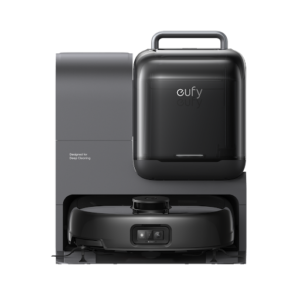
After a run, review the route and adjust the zones if the robot gets too close to a bowl or skips more floor than intended. If you are comparing models, the eufy robot vacuum and mop lets you check current mapping and cleaning options. Pick a model for the floor plan you actually have, then keep the simple pickup routine for objects that move from day to day.
Conclusion
A reliable obstacle plan has two parts. Move loose cords and toys before cleaning, then map trouble spots such as the pet feeding area or a low furniture gap. Watch the first runs, revise zones that miss their target, and repeat the quick pickup routine before scheduled cleans. The robot’s map can help maintain a consistent route, while the changing floor still needs a glance. Repeat that floor check whenever furniture, charging cables, or play areas have moved.