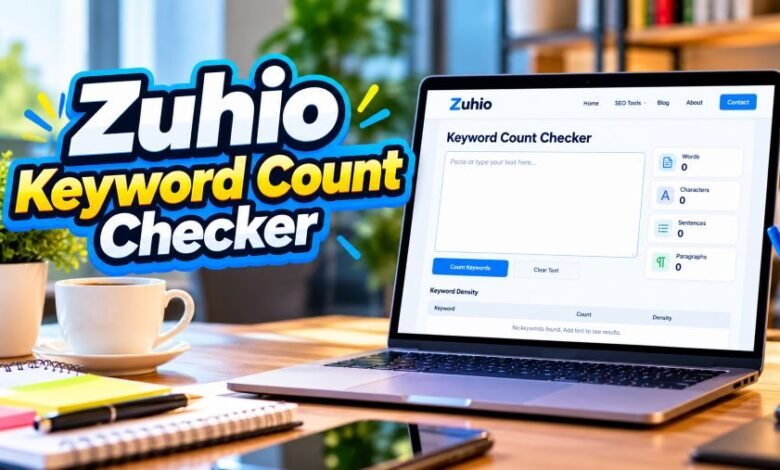
Zuhio Keyword Count Checker: Does This Free SEO Tool Really Work?
An honest look at Zuhio, its keyword-counting features, how to use it, common problems, and what writers should know before trusting the results.

Introduction
Writing an article takes time. Checking every keyword takes patience.
You’ve finished a 1,500-word blog post. Your client wants ten specific keywords included. Now you need to check whether you’ve used every phrase correctly.
Sounds simple, right?
Well, doing it manually gets boring. You search for one keyword, count its appearances, and repeat the process.
That’s where Zuhio Keyword Count Checker comes in.
It’s a free browser-based tool that checks how often selected keywords appear in your written content. Writers can paste their keyword list and article into the tool to review keyword usage before publishing.
But there’s another side to the story.
Independent reviewers have reported both successful results and technical problems. Some descriptions of the tool also mention features that don’t appear in more recent hands-on testing.
So, what does Zuhio actually offer? And should writers depend on it?
Here’s what the available evidence tells us.
Quick Facts About the Tool
| Detail | Information |
|---|---|
| Name | Zuhio Keyword Count Checker |
| Website | zuhio.com |
| Type | Online keyword counting tool |
| Main purpose | Checking keyword frequency in text |
| Cost | Free, according to independent reviews |
| Registration | Not required in reported tests |
| Installation | No software installation needed |
| Access | Web browser |
| Keyword support | Individual words and phrases |
| Best for | Bloggers, writers, SEO editors |
| Live URL analysis | Not found in recent hands-on tests |
| Export feature | Not found in recent hands-on tests |
| Exact launch date | Not publicly verified |
| Founder | Not publicly verified |
| Latest research | October 2026 |
What Is Zuhio and What Does It Actually Do?
Zuhio is a website offering small online productivity tools.
Its keyword checker focuses on one job. It counts the appearance of specified keywords within pasted content.
The idea is pretty straightforward.
A writer completes an article. The content brief includes several target phrases. Instead of searching for each phrase separately, the writer checks them together.
The tool then reports keyword counts.
According to Zuhio’s official website, its advertised features include keyword frequency checking and support for multi-word phrases.
Recent independent testing describes a more specific workflow: users enter keywords along with required mention ranges, paste their article, and check which terms meet their targets.
Think about a writing assignment.
Your editor requests these phrases:
- SEO content writing
- Keyword research tools
- Search engine rankings
- Content marketing strategy
Each phrase has a required mention count.
The checker can compare those requirements with the text.
That’s its main job.
It doesn’t write the article. It doesn’t research the topic. And it can’t tell whether every sentence sounds natural.
Those decisions still belong to the writer.
The Background and History of Zuhio
Zuhio describes itself as a platform building small software tools for everyday business problems.
Its official website discusses practical applications for entrepreneurs, startups, and working teams.
The keyword checker is one of the services promoted on its homepage.
When Did It Become Known?
Public articles discussing the checker were appearing during 2026.
The EarlyTerms tracking website identifies March 18, 2026, as an early point in the term’s public coverage.
More discussions appeared in the following months.
By July and August, reviewers were questioning some of the tool’s advertised features and testing whether the checker worked consistently.
An August 2026 review by WriteNexa provided a detailed account of entering keyword ranges and reading the results.
An October 2026 review by Trustvor described a similar workflow.
That gives us a clearer picture.
Still, the precise product launch date hasn’t been independently established. The first published article about a service isn’t proof of its original release date.
Who Owns the Platform?
The website has an About page and public contact information.
However, the available official material doesn’t clearly identify a verified founder or founding date.
It would be misleading to assign ownership to a particular person without reliable evidence.
For now, Zuhio is the publicly identified brand behind the checker.
Main Features That Writers Should Know
The checker has a small set of practical functions.
And that’s perfectly reasonable. Not every writing task needs expensive software.
1. Checking Keyword Frequency
This is the primary feature.
The tool reports how often a keyword appears in submitted text.
Suppose you’ve written an article about electric vehicles.
You want to check the phrase “electric car battery.”
Rather than reviewing every paragraph manually, you can use a keyword counter to identify its occurrences.
This saves repetitive searching.
But remember one thing.
A higher count doesn’t automatically mean better SEO.
2. Checking Several Keywords Together
Recent hands-on reviews describe a batch-checking function.
Users can enter multiple keywords in the input area.
The checker then compares the list with the submitted article.
This feature makes sense for content agencies.
A writer may receive a brief containing fifteen or twenty keywords. Checking each one manually takes extra time.
A batch checker makes that job easier.
3. Supporting Multi-Word Phrases
Some keywords contain several words.
For example:
- Best budget smartphones
- Online business ideas
- Digital marketing services
- Affordable family holidays
The official website states that Zuhio supports keyword phrases.
This matters because a phrase has a different meaning from its individual words.
Checking “family holidays” shouldn’t be confused with counting every separate appearance of “family” or “holidays.”
4. Checking Required Mention Ranges
An August 2026 hands-on review described a feature for entering target mention ranges.
For example, a content brief might require a keyword to appear between three and six times.
The checker compares the actual count against the specified requirement.
The reviewer reported that results separate missing targets from satisfied ones.
One limitation deserves attention.
The same reviewer found that exceeding a maximum range wasn’t automatically flagged in the same way as missing a minimum.
So writers still need to watch for repetition.
5. Browser-Based Access
You don’t need to install separate desktop software.
Independent reviewers accessed the checker through the Zuhio website.
They also reported that no account was required.
That makes the tool convenient for quick article checks.
Still, availability and functionality may change as the website is updated.
How to Use the Checker for Your Articles
The process is short.
But the keyword format matters.
Open the Website
Visit Zuhio’s official website.
Find the Keyword Count Checker section.
Recent independent reviews describe two main text boxes and a Check Keywords button.
Prepare Your Keyword List
Collect the phrases from your writing brief.
A detailed August 2026 test reported that the tool expects each keyword to be paired with a mention target, separated by a tab character.
For example, a spreadsheet could contain:
| Keyword | Required mentions |
|---|---|
| content writing | 3-5 |
| SEO tools | 2-4 |
| keyword research | 3-6 |
| blog publishing | 1-3 |
These numbers are fictional examples, not Google recommendations.
The easiest way to preserve tab-separated formatting may be to copy two spreadsheet columns directly into the keyword field.
Paste Your Article
Copy your completed article.
Then paste it into the content field.
Make sure you’ve included the sections you want counted.
An incomplete paste produces incomplete results.
Run the Check
Click the Check Keywords button.
If the input matches the expected format and the tool is functioning, it should return counts for the specified terms.
Review the results carefully.
Fix Missing or Repeated Phrases
Check which keywords appear less often than your brief requires.
Then read the relevant paragraphs.
Sometimes a missing phrase fits naturally. Sometimes it doesn’t.
Don’t force awkward wording into a sentence just to satisfy a number.
Your readers matter more.
A Simple Example of Keyword Checking
Imagine you’re writing about home gardening.
Your article has 1,200 words.
You want to review four target phrases.
Here’s a fictional example of the kind of count check an editor might perform:
| Keyword | Target range | Actual count | Editorial decision |
|---|---|---|---|
| home gardening | 3-5 | 4 | Meets brief |
| indoor plants | 2-4 | 3 | Meets brief |
| gardening tips | 2-3 | 1 | Review missing mention |
| plant care | 2-4 | 5 | Check repetition |
These are sample figures only. They are not results from a live Zuhio test.
Notice the last phrase.
“Plant care” appears five times.
That doesn’t automatically make the article bad. Maybe the phrase fits naturally.
But an editor should check.
Numbers start the review. Human judgment finishes it.
Can It Calculate Keyword Density?
This question has caused confusion.
Many online articles describe Zuhio as a traditional keyword density calculator.
A standard density calculator uses a formula based on keyword occurrences and total word count.
For a simple single-word keyword, the calculation is:
Keyword density = (Keyword appearances ÷ Total words) × 100
Imagine a 1,000-word article.
A particular word appears ten times.
Its basic density is 1%.
Multi-word phrases require extra care because counting methods may differ.
Here’s the issue with Zuhio.
Recent hands-on reviews describe it mainly as a multi-keyword checker rather than a dedicated percentage calculator.
Some older articles claim it displays density percentages. Those claims aren’t consistently supported by the more detailed interface tests.
So don’t assume the current tool provides every feature mentioned on third-party websites.
Check the actual interface first.
Does Keyword Density Matter for Google SEO?
Yes, keyword usage matters for clarity and relevance.
But fixed density targets are another story.
Google doesn’t publish a universal percentage that guarantees better rankings.
Its official spam policies warn against keyword stuffing.
That means repeating terms unnaturally to manipulate search results.
A sentence should make sense to a person.
Think about this example:
“Best running shoes are the best running shoes because these best running shoes offer the best running shoes quality.”
That’s unpleasant to read.
A keyword counter might show a high count, but the writing itself is poor.
Instead, explain the product properly.
Discuss comfort, sizing, durability, and real user needs.
For more information, read Google’s official search spam policies.
The lesson is simple.
Use the words people search for. Don’t repeat them without a reason.
Is Zuhio Reliable? What Independent Reviews Found
This is where things get interesting.
Public reviews don’t fully agree.
Some testers report useful results. Others describe technical failures.
Reports of Technical Problems
A July 2026 investigation by Mostly Blogging reported that the checker failed to return expected results during testing.
The reviewer also questioned articles describing features that weren’t visible on the actual website.
That raises a fair concern.
A software review should reflect the product being tested, not an imagined feature list.
A More Detailed August Test
WriteNexa published a hands-on review on August 26, 2026.
The reviewer reported that the checker worked when keywords were entered with the expected target-range formatting.
The review also identified a weakness.
Incorrectly formatted input could fail without showing a useful error message.
That’s frustrating for first-time users.
What an October Review Found
Trustvor published another hands-on account on October 1, 2026.
The reviewer reported that a keyword list copied with bullet symbols initially produced no response.
After removing the formatting, the reviewer was able to obtain results.
Other testers reportedly experienced failures even with simpler inputs.
So the evidence is mixed.
There are credible reports of the tool working, but there are also documented usability concerns.
That doesn’t mean every visitor will experience a problem.
It means you should verify important counts before sending an article to a client.
Why the Checker Sometimes Doesn’t Respond
Several issues may explain an unsuccessful check.
Incorrect Keyword Formatting
The tool may expect keywords and target ranges in a specific format.
Pasting a plain list may not work.
Check the expected input style before trying again.
Unwanted Characters
Bullets, unusual spacing, and copied formatting can interfere with text processing.
One independent reviewer fixed an unsuccessful attempt by removing bullet symbols.
Plain spreadsheet data may work better.
Website or Script Problems
Sometimes an input is correct, but the tool still fails.
Independent testing has documented this possibility.
If that happens, manual checking is a reasonable backup.
Browser-Related Problems
Trying another browser may help rule out local issues.
However, a browser change isn’t a confirmed fix for every reported failure.
If the tool remains unresponsive, don’t keep changing your article to make the checker happy.
The problem might be the tool itself.
Who Can Benefit From This Tool?
Different writers have different needs.
For some, a simple checker is enough.
Bloggers
Bloggers often work with target search phrases.
A keyword counter can help check whether those phrases appear in a draft.
It’s particularly useful before publication.
Freelance Content Writers
Many freelance assignments include keyword requirements.
An editor might request five secondary terms alongside the main topic.
A batch check can catch missing phrases before submission.
SEO Agencies
Agencies handle multiple writers and client briefs.
Keyword-count checking can support a basic content quality review.
It shouldn’t replace editorial checks, though.
Website Owners
Small website owners may want a quick review without paying for a larger SEO subscription.
For that limited purpose, a free checker may be enough.
Students and Researchers
Anyone reviewing repeated terminology in their own writing may find a text counter useful.
Still, Zuhio’s reported design is primarily suited to keyword briefs rather than specialist academic text analysis.
What Are the Main Benefits?
The biggest benefit is simplicity.
The checker focuses on a small task.
Users don’t need a full SEO dashboard just to count a phrase.
Other potential benefits include:
- Checking several keywords in one session.
- Finding missing terms before publication.
- Reducing repetitive manual searches.
- Reviewing keyword requirements from client briefs.
- Accessing the tool without a paid subscription, according to independent testing.
Those benefits depend on the tool responding correctly.
And that’s an important condition.
What Are Its Main Limitations?
There are clear boundaries.
The checker isn’t a complete SEO platform.
Recent hands-on reviews did not identify built-in competitor analysis, live URL scanning, keyword search-volume data, or export functions.
It also doesn’t replace proper editing.
A count can’t tell whether your introduction answers the reader’s question.
It can’t verify a statistic.
It can’t decide whether you’ve explained a difficult topic clearly.
Those jobs require more work.
The tool’s error handling has also drawn criticism.
If an input fails without an explanation, first-time users may not understand what went wrong.
That weakens its usefulness.
Is It Safe to Paste Your Content Into Zuhio?
Be careful with private material.
The website publishes a privacy policy, but the available information doesn’t clearly confirm how long pasted checker content is retained or whether text is processed entirely inside the browser.
That leaves an unanswered question.
What happens to submitted drafts?
For publicly available blog articles, the risk may be less concerning.
But confidential client work is different.
Avoid entering passwords, unpublished business plans, personal records, or material protected by a non-disclosure agreement unless you can verify how the tool handles submitted text.
You can read the Zuhio privacy policy before using the service.
Zuhio vs Other Popular SEO Tools
A keyword counter and a full SEO platform aren’t direct replacements.
Here’s the difference.
| Tool | Main purpose | Suitable for |
|---|---|---|
| Zuhio | Checking keyword mentions | Content briefs |
| WordCounter | Text and word statistics | General editing |
| Rank Math | WordPress SEO checks | Website publishers |
| Yoast SEO | WordPress content checks | Bloggers |
| Ahrefs | Keyword and competitor research | SEO research |
| Semrush | SEO research and site audits | Marketing teams |
For example, Ahrefs can help research search demand.
Rank Math can review selected on-page SEO elements.
Zuhio focuses on counting specified terms in pasted text.
Each tool handles a different part of the work.
Can Zuhio Replace Rank Math?
No.
Rank Math is a WordPress SEO plugin.
It supports tasks such as editing SEO titles, meta descriptions, and page-level search settings.
Zuhio’s checker doesn’t provide that same publishing workflow.
But the two can serve different purposes.
A writer may use a keyword counter to inspect a draft, then use Rank Math for WordPress publishing checks.
The important point is choosing software based on the job.
Don’t expect a small counting utility to replace every SEO feature.
What Makes a Good Keyword-Checking Routine?
A useful editing routine doesn’t need to be complicated.
Start with the article itself.
Does it answer the main question? Are the facts accurate? Does every paragraph offer something useful?
Then check the target phrases.
See whether any required term is missing.
Review repeated wording.
Next, read the article again.
This matters because keyword tools only measure selected aspects of text.
A technically correct count can sit inside a weak article.
And a useful, readable article can perform its job without hitting an arbitrary density percentage.
Keep that difference in mind.
Is Zuhio Worth Using in 2026?
It depends on what you need.
For quick checks against a list of required keywords, the tool offers a practical idea.
It’s accessible through a browser. Independent reviews describe it as free. And successful tests show it can compare keyword requirements with pasted content.
But the reported technical problems matter.
Error messages are limited, according to reviewers.
Input formatting can be confusing.
Some third-party guides also describe features that don’t match detailed testing.
So the sensible approach is simple.
Try it with a short, non-sensitive sample first.
Verify the results.
And keep another counting method available.
Final Thought
Zuhio Keyword Count Checker has a straightforward purpose: checking whether specified keywords appear in written content.
That sounds small.
But for writers handling long keyword briefs, even a small time-saving tool can be useful.
The catch is reliability.
Independent testing has shown both working results and frustrating failures. Some advertised features also remain unclear.
For now, Zuhio is best treated as an optional editorial helper rather than a complete SEO solution.
Use it to check numbers.
Use your own judgment to check the writing.
Good content needs both accuracy and a reason for people to keep reading.
Frequently Asked Questions
1. What is Zuhio Keyword Count Checker?
It’s an online tool that checks how often selected keywords or phrases appear in pasted written content.
2. Is it free to use?
Yes. Independent reviews published in 2026 describe the publicly available checker as free, with no required registration.
3. Where can I find the tool?
Visit zuhio.com and find the Keyword Count Checker section on the website.
4. Can it check multiple keywords?
Yes. Recent hands-on reviews describe a workflow that checks several keywords against one article.
5. Does it calculate keyword density?
Some published descriptions claim this feature. However, detailed recent tests focus on keyword counts and required mention ranges. Percentage calculations haven’t been consistently verified.
6. Why isn’t the Check Keywords button working?
Incorrect input formatting may cause problems. Independent reviewers have also reported unresponsive checks. Try properly formatted keyword data and verify the results using another method.
7. Can it help improve Google rankings?
It may help writers review keyword usage, but it doesn’t guarantee ranking improvements. Search performance depends on many factors beyond repeated phrases.
8. Who created Zuhio?
The website identifies Zuhio as the brand offering the tool, but a named founder and exact founding date haven’t been independently verified.