How to Use an Invisible Text Generator for Blank Space
How to Use an Invisible Text Generator for Blank Space

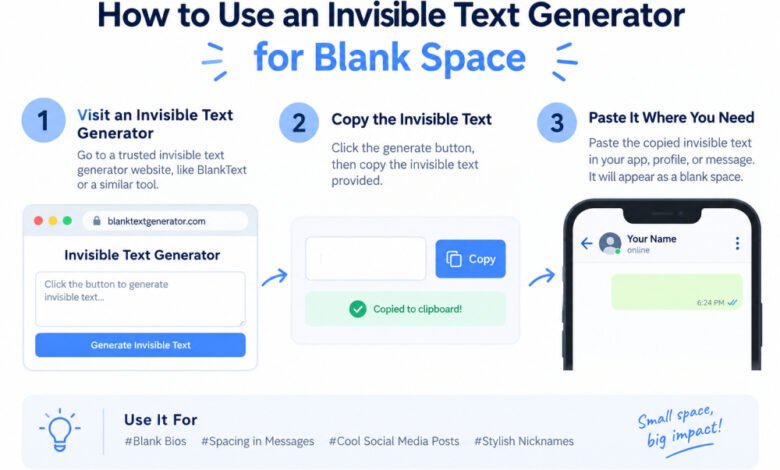
An invisible text generator is a digital tool that copies unique Unicode characters that look entirely empty on your screen but register as valid data with computers. These specialized symbols let you submit form fields, group labels, or profile names without using visible letters or standard spaces.
Ever tried to clear your name field on Discord or WhatsApp only to get a harsh red error message saying it cannot be empty? It is incredibly annoying. System filters are strictly built to prevent users from leaving text boxes completely blank. But an online tool bypasses this by handing your clipboard a real, registered character that happens to have zero ink or pixels assigned to it.
Here is the secret. The system reads it as a valid piece of information, while any person looking at your profile sees nothing but clean, open space.
Why Regular Spaces Fail Where Blank Text Works
Most online platforms run a basic code command called “trimming” the second you click submit. If you type five standard spaces using your spacebar into an Instagram bio field, the platform’s backend code strips away that whitespace automatically. It reduces your five spaces down to zero characters, decides the box is empty, and blocks your update.
Specialized blank text functions differently because Unicode assigns specific categories to characters. The regular spacebar key is classified explicitly as “whitespace,” which makes it an instant target for app cleanup filters.
Take the Hangul Filler character, known technically as code U+3164. Unicode officially categorizes this specific code as a letter because it stems from historic Korean alphabet typesetting systems. It has been a functional part of global computer systems since 1993. When an online validation script checks your new nickname, it detects a registered letter, pauses, and lets it slide right past the filter.
How Do Different Invisible Characters Compare?
Not all invisible text is identical. Different platforms require different invisible characters to achieve the desired effect.
- Hangul Filler (U+3164): This character is a wide, letter-sized blank space. It is ideal for gaming nicknames and empty text bubbles because systems treat it like a full alphabet character.
- Braille Blank (U+2800): This option has the exact width of a standard alphabet letter. It is perfect for adding clean, forced line breaks in social media bios without collapsing.
- Zero-Width Space (U+200B): This specialized character has absolutely no width on screen. It is mostly used to force long links or massive words to wrap naturally to the next line without leaving a visible gap.
- Zero-Width Non-Joiner (U+200C): This takes up no horizontal room whatsoever. It works cleanly as a hidden divider in specific private messaging channels.
Practical Ways to Use Invisible Characters Everyday
Bypassing Chat App Restrictions
Messaging services like WhatsApp block you from sending a message that contains only spaces; the send button stays grayed out. If you paste a single U+3164 character into the chat field, the send arrow turns green instantly. Your recipient receives a blank chat bubble. It looks like a glitch, making it a fun option for harmless pranks or organizing messy chat histories.
Fixing Social Media Layout Spacing
Instagram captions and bios often collapse vertical line breaks automatically, smashing your paragraphs into an unreadable wall of text. Placing a single Braille Blank character on an empty line forces the application to respect your spacing layout. Your spacing remains completely intact, giving your profile page an organized look.
Creating Invisible Game Usernames
In mobile games like Free Fire or PUBG, an empty character lets you drop your visible nickname entirely. This hides your identity on public leaderboards and match feeds.
But keep one reality check in mind. Having a totally blank name makes it exceptionally difficult for other players to type out your name to report you. Because of this, certain gaming anti-cheat groups view fully invisible names as a rule violation. It is generally safer to stick to casual or secondary accounts if you want to experiment with invisible text tags.
How to Generate and Copy Blank Text
The simplest way to gather these characters is to use a direct, single-tap web generator tool.
- Go directly to fontsgeneratorx.com using any desktop or mobile internet browser.
- Choose your preferred invisible character option from the provided list, such as the Hangul Filler.
- Select the specific quantity of blank characters you want to generate.
- Click the green “Copy Invisible Text” button to place the character directly onto your device’s active clipboard.
- Use the site’s integrated Test Box to paste and verify your characters before using them elsewhere.
Troubleshooting Common Blank Text Glitches
What happens if you paste your newly copied code and a strange, blocky square with an “X” or a question mark inside shows up instead of an empty space?
Do not panic. This is not a virus or a broken tool. Your specific device or application font files simply lack the specific Unicode data needed to display that character. This rendering glitch happens most often on older Android operating systems or smart TV browsers trying to process the Braille Blank character.
If you encounter this issue, head back to your generator tool, switch your option over to the classic Hangul Filler, and copy a new string. This generally resolves the display glitch across almost all modern digital screens.
-
FAQ Section
Why does a platform reject my blank name?
Many modern apps update their software filters regularly to block popular blank characters or require at least one visible letter to save an account. If you get an error message, try adding a small visible symbol like a period or a simple hyphen right next to your invisible character.
Why won’t the green copy button work on my mobile phone?
Older Android operating systems and certain in-app web browsers found inside apps like Instagram or TikTok frequently disable automatic clipboard copying commands for security reasons. If this happens, tap your browser’s three-dot menu icon, select “Open in Chrome” or “Open in Safari,” and try the copy button again.
Do blank characters count toward maximum character limits?
Yes, every individual blank character you paste counts as a full character slot against your limit. For example, if a gaming profile name has a strict limit of 12 characters and you include 3 invisible fillers, you only have 9 character spaces left for real letters.
Is using invisible text completely safe for my device?
Yes, generating and using invisible text is safe because each blank space is simply a standardized, plain Unicode text character. These symbols do not contain underlying executable system scripts, programming code, tracking files, or harmful hidden data payloads.
-
Conclusion
The single most important takeaway is that invisible text functions as a legitimate letter character in the eyes of computer operating systems, allowing you to easily slip past standard text validation filters that reject regular spaces.